
15-minute quick start#
Welcome to GenSBI! This page is a quick guide to get you started with installation and basic usage.
Installation#
Using uv (recommended):
uv add gensbi
# or, for a standalone install:
uv pip install gensbi
Or using pip:
pip install gensbi
If a GPU is available, it is advisable to install the CUDA version of the package:
uv add gensbi[cuda12]
# or
pip install gensbi[cuda12]
See the Installation Guide for more options, including how to install the examples.
Requirements#
Python 3.12+
JAX
Flax
(See
pyproject.tomlfor full requirements)
Basic Usage#
To get started fast, use the provided recipes.
Note
The example below is a minimal script designed for copy-pasting by experienced users. If you want a step-by-step educational walkthrough that explains the concepts, please see the My First Model Tutorial.
Here is a minimal example of setting up a flow-based conditional inference pipeline using Flux1.
This example covers:
Data Generation: Creating synthetic data for a simple linear problem.
Model Configuration: Setting up the
Flux1parameters.Pipeline Creation: Initializing the
Flux1FlowPipelinewhich handles training and sampling.Training: Running the training loop.
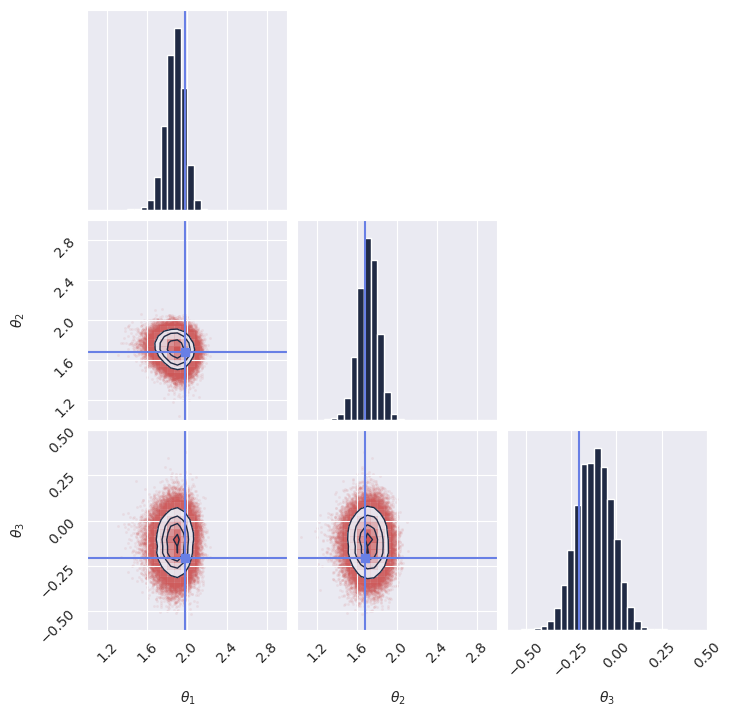
Inference: Sampling from the posterior given new observation.
The code below is a complete, runnable script:
  1# %% Imports
  2import os
  3
  4# Set JAX backend (use 'cuda' for GPU, 'cpu' otherwise)
  5# os.environ["JAX_PLATFORMS"] = "cuda"
  6
  7import grain
  8import numpy as np
  9import jax
 10from jax import numpy as jnp
 11from numpyro import distributions as dist
 12from flax import nnx
 13
 14from gensbi.recipes import Flux1FlowPipeline
 15from gensbi.models import Flux1, Flux1Params
 16
 17from gensbi.utils.plotting import plot_marginals
 18import matplotlib.pyplot as plt
 19
 20
 21# %%
 22
 23theta_prior = dist.Uniform(
 24    low=jnp.array([-2.0, -2.0, -2.0]), high=jnp.array([2.0, 2.0, 2.0])
 25)
 26
 27dim_obs = 3
 28dim_cond = 3
 29dim_joint = dim_obs + dim_cond
 30
 31
 32# %%
 33def simulator(key, nsamples):
 34    theta_key, sample_key = jax.random.split(key, 2)
 35    thetas = theta_prior.sample(theta_key, (nsamples,))
 36
 37    xs = thetas + 1 + jax.random.normal(sample_key, thetas.shape) * 0.1
 38
 39    thetas = thetas[..., None]
 40    xs = xs[..., None]
 41
 42    # when making a dataset for the joint pipeline, thetas need to come first
 43    data = jnp.concatenate([thetas, xs], axis=1)
 44
 45    return data
 46
 47
 48# %% Define your training and validation datasets.
 49# We generate a training dataset and a validation dataset using the simulator.
 50# The simulator is a simple function that generates parameters (theta) and data (x).
 51# In this example, we use a simple Gaussian simulator.
 52train_data = simulator(jax.random.PRNGKey(0), 100_000)
 53val_data = simulator(jax.random.PRNGKey(1), 2000)
 54
 55
 56# %% Normalize the dataset
 57# It is important to normalize the data to have zero mean and unit variance.
 58# This helps the model training process.
 59means = jnp.mean(train_data, axis=0)
 60stds = jnp.std(train_data, axis=0)
 61
 62
 63def normalize(data, means, stds):
 64    return (data - means) / stds
 65
 66
 67def unnormalize(data, means, stds):
 68    return data * stds + means
 69
 70
 71# %% Prepare the data for the pipeline
 72# The pipeline expects the data to be split into observations and conditions.
 73# We also apply normalization at this stage.
 74def split_obs_cond(data):
 75    data = normalize(data, means, stds)
 76    return (
 77        data[:, :dim_obs],
 78        data[:, dim_obs:],
 79    )  # assuming first dim_obs are obs, last dim_cond are cond
 80
 81
 82# %%
 83
 84# %% Create the input pipeline using Grain
 85# We use Grain to create an efficient input pipeline.
 86# This involves shuffling, repeating for multiple epochs, and batching the data.
 87# We also map the split_obs_cond function to prepare the data for the model.
 88batch_size = 256
 89
 90train_dataset_grain = (
 91    grain.MapDataset.source(np.array(train_data))
 92    .shuffle(42)
 93    .repeat()
 94    .to_iter_dataset()
 95    .batch(batch_size)
 96    .map(split_obs_cond)
 97    # .mp_prefetch() # Uncomment if you want to use multiprocessing prefetching
 98)
 99
100val_dataset_grain = (
101    grain.MapDataset.source(np.array(val_data))
102    .shuffle(42)
103    .repeat()
104    .to_iter_dataset()
105    .batch(batch_size)
106    .map(split_obs_cond)
107    # .mp_prefetch() # Uncomment if you want to use multiprocessing prefetching
108)
109
110# %% Define your model
111# specific model parameters are defined here.
112# For Flux1, we need to specify dimensions, embedding strategies, and other architecture details.
113params = Flux1Params(
114    in_channels=1,
115    vec_in_dim=None,
116    context_in_dim=1,
117    mlp_ratio=3,
118    num_heads=2,
119    depth=4,
120    depth_single_blocks=8,
121    axes_dim=[
122        10,
123    ],
124    qkv_bias=True,
125    dim_obs=dim_obs,
126    dim_cond=dim_cond,
127    theta=10 * dim_joint,
128    id_embedding_strategy=("absolute", "absolute"),
129    rngs=nnx.Rngs(default=42),
130    param_dtype=jnp.float32,
131)
132
133
134# %% Instantiate the pipeline
135# The Flux1FlowPipeline handles the training loop and sampling.
136# We configure it with the model parameters, datasets, dimensions using a default training configuration.
137training_config = Flux1FlowPipeline.get_default_training_config()
138training_config["nsteps"] = 10000
139
140pipeline = Flux1FlowPipeline(
141    train_dataset_grain,
142    val_dataset_grain,
143    dim_obs,
144    dim_cond,
145    params=params,
146    training_config=training_config,
147)
148
149# %% Train the model
150# We create a random key for training and start the training process.
151rngs = nnx.Rngs(42)
152pipeline.train(
153    rngs, save_model=False
154)  # if you want to save the model, set save_model=True
155
156# %% Sample from the posterior
157# To generate samples, we first need an observation (and its corresponding condition).
158# We generate a new sample from the simulator, normalize it, and extract the condition x_o.
159
160new_sample = simulator(jax.random.PRNGKey(20), 1)
161true_theta = new_sample[:, :dim_obs, :]  # extract observation from the joint sample
162
163new_sample = normalize(new_sample, means, stds)
164x_o = new_sample[:, dim_obs:, :]  # extract condition from the joint sample
165
166# Then we invoke the pipeline's sample method.
167samples = pipeline.sample(rngs.sample(), x_o, nsamples=100_000)
168# Finally, we unnormalize the samples to get them back to the original scale.
169samples = unnormalize(samples, means[:dim_obs], stds[:dim_obs])
170
171# %% Plot the samples
172# We verify the model's performance by plotting the marginal distributions of the generated samples
173# against the true parameters.
174plot_marginals(
175    np.array(samples[..., 0]),
176    gridsize=30,
177    true_param=np.array(true_theta[0, :, 0]),
178    range=[(1, 3), (1, 3), (-0.6, 0.5)],
179)
180plt.savefig("flux1_flow_pipeline_marginals.png", dpi=100, bbox_inches="tight")
181plt.show()
182
183# %% Alternative: sample with ZeroEndsSolver (SDE-based flow matching sampler)
184# Instead of the default deterministic ODE solver, you can use the ZeroEndsSolver
185# for stochastic sampling in flow matching. This can sometimes improve sample diversity.
186# The SDE solver requires mu0 (prior mean) and sigma0 (prior std) matching the
187# data shape, plus an alpha parameter controlling diffusion strength.
188from gensbi.flow_matching.solver import ZeroEndsSolver
189
190solver_kwargs = {
191    "mu0": jnp.zeros((dim_obs, 1)),  # prior mean (data is normalized)
192    "sigma0": jnp.ones((dim_obs, 1)),  # prior std
193    "alpha": 0.2,  # diffusion strength
194}
195
196samples_sde = pipeline.sample(
197    rngs.sample(),
198    x_o,
199    nsamples=100_000,
200    solver=(ZeroEndsSolver, solver_kwargs),
201)
202samples_sde = unnormalize(samples_sde, means[:dim_obs], stds[:dim_obs])
203
204plot_marginals(
205    np.array(samples_sde[..., 0]),
206    gridsize=30,
207    true_param=np.array(true_theta[0, :, 0]),
208    range=[(1, 3), (1, 3), (-0.6, 0.5)],
209)
210plt.savefig("flux1_flow_pipeline_sde_marginals.png", dpi=100, bbox_inches="tight")
211plt.show()
212
213# %%
Note
If you plan on using multiprocessing prefetching, ensure that your script is wrapped
in a if __name__ == "__main__": guard.
See https://docs.python.org/3/library/multiprocessing.html
See the full example notebook my_first_model for a more detailed walkthrough, and the Examples page for practical demonstrations on common SBI benchmarks.
Citing GenSBI#
If you use this library, please consider citing this work and the original methodology papers, see references.
For the paper:
@article{amerio2026gensbi_paper,
      title={GenSBI: Generative Methods for Simulation-Based Inference in JAX},
      author={Aurelio Amerio},
      year={2026},
      eprint={2605.27499},
      archivePrefix={arXiv},
      primaryClass={cs.LG},
      url={https://arxiv.org/abs/2605.27499},
}
For the software:
@software{amerio2026gensbi_software,
  author       = {Amerio, Aurelio},
  title        = {GenSBI: Generative Methods for Simulation-Based Inference in JAX
                  },
  month        = may,
  year         = 2026,
  publisher    = {Zenodo},
  version      = {v0.3.4},
  doi          = {10.5281/zenodo.20410084},
  url          = {https://doi.org/10.5281/zenodo.20410084},
}